Run every job from one app.
Northpin books the work, dispatches it to your crew's phone, sends quotes customers sign, and collects the payment. One login for the office, the crew and your customers.
No card needed. Set up in about ten minutes.
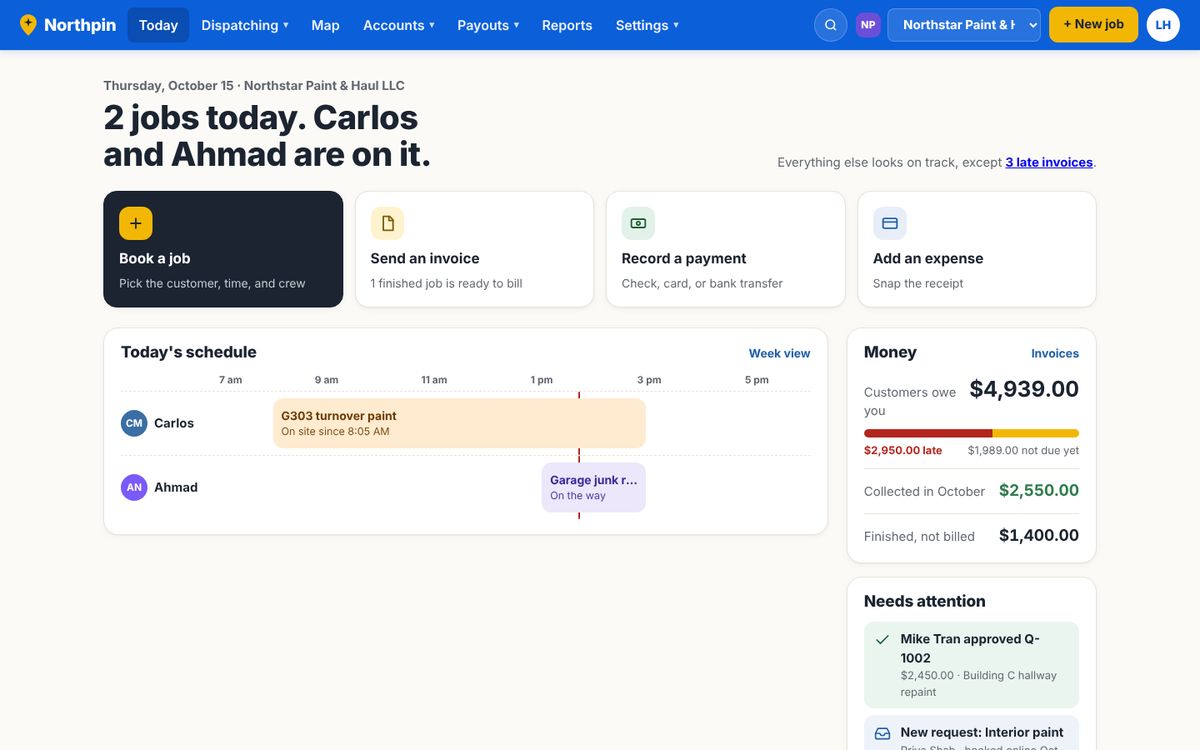
Everything your business runs on, in one place
Most crews juggle a calendar, a whiteboard, a texting app, an invoicing tool and a card reader. Northpin does all of it, and every part already knows about the others.
- Schedule and dispatchDrag jobs onto a person and a day. Repeating work books itself.
- Crew appWorks on any iPhone or Android, no download. Jobs, directions, photos, signatures and receipts.
- Live crew mapWho's on the clock, where, and the route they drove today.
- Quotes they signSent by text or email. They approve and sign on their phone.
- InvoicesBuilt from the job in one click, with your logo and terms.
- Payments built inCustomers pay by card or bank. The invoice marks itself paid.
- Texts and reminders"On my way," the day-before reminder, and review requests.
- Books and reportsProfit and loss, crew pay, 1099s, and QuickBooks exports.
Replaces: the whiteboard · group texts · paper quotes · a separate invoicing app · a separate card reader
From the first call to paid
Every step happens in Northpin, so nothing gets written on a napkin, lost in a text thread, or forgotten on a truck seat.
- They ask
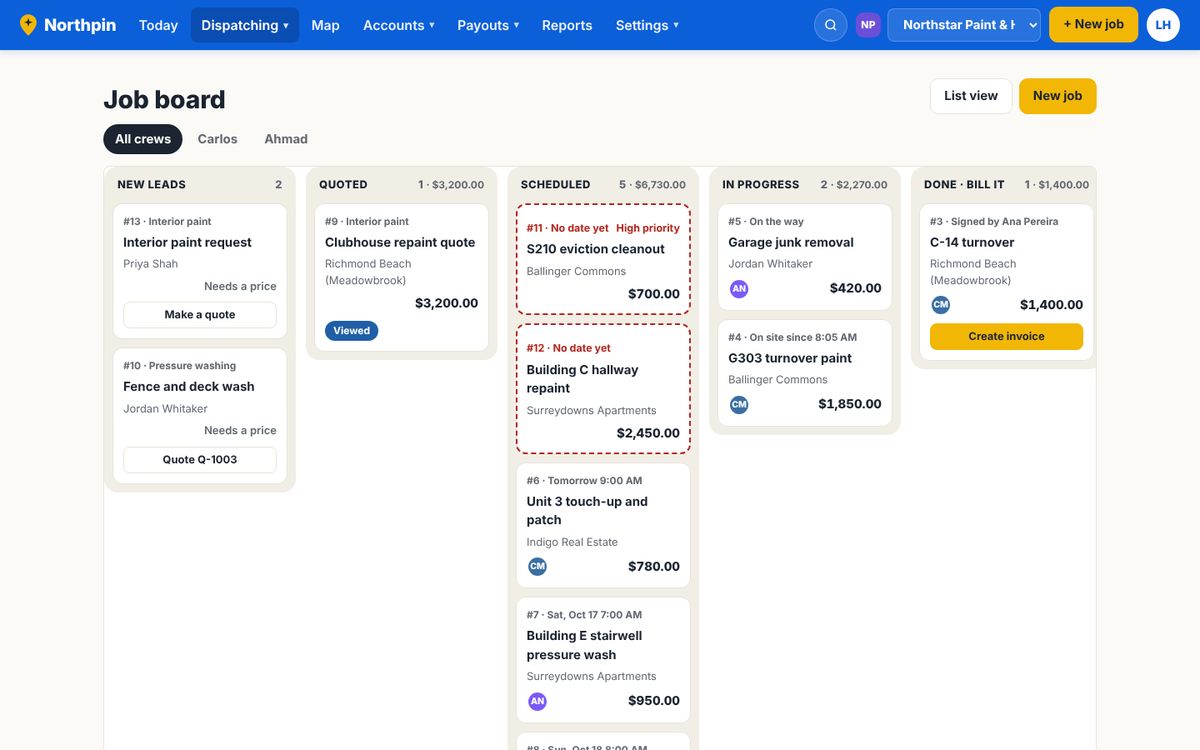
A customer fills in your booking page, or you add the call. It lands on your Job board as a new lead.
- You quote
Pick prices from your list, or let AI fill the lines from your rate sheet. They sign with a finger.
- You dispatch
Drag it onto a day and a person. It shows up on their phone right away.
- The crew goes
One tap for directions. Another texts the customer "on the way."
- The work is proved
Before and after photos, notes and the customer's signature, stamped with the time.
- You get paid
The invoice fills itself in. The customer pays online and it's marked paid.
See the whole week. Move a job with your mouse.
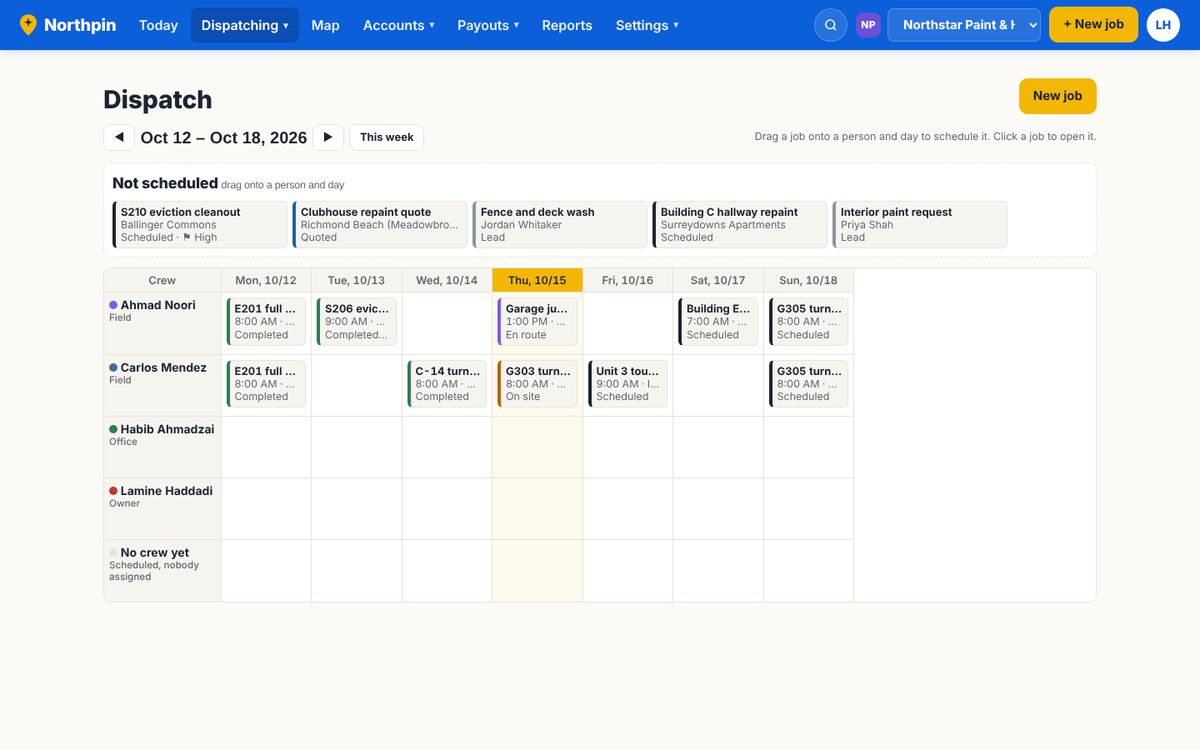
The schedule shows every crew member down the side and the days across the top. Drag a job onto a person and it's theirs. The Job board shows every job from new lead to paid, so nothing sits forgotten.
- Unscheduled jobs wait at the top until you place them
- Weekly or monthly work repeats on its own
- Overdue, unpaid and missing-info jobs are flagged for you
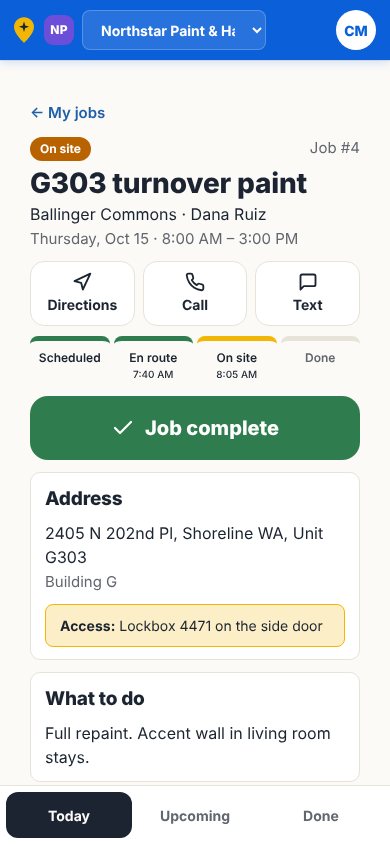
Your crew opens the app and the work is waiting.
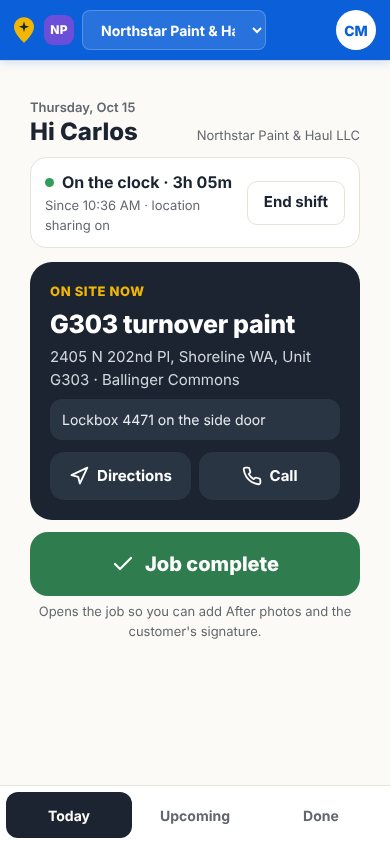
When you dispatch a job, it appears on that person's phone. They see where to go, what to do and how to get in. They never see your prices.
- Big buttons: On my way, On site, Job complete
- Before and after photos, notes and the customer's signature
- Clock in and out, with location while they're on the clock
- Snap fuel, meal and dump receipts straight into your expenses
- Keeps working with no signal and catches up later
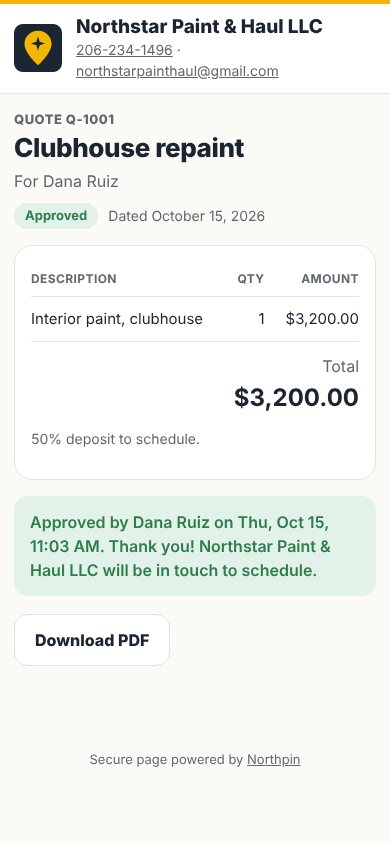
Customers approve on their phone. You get the job.
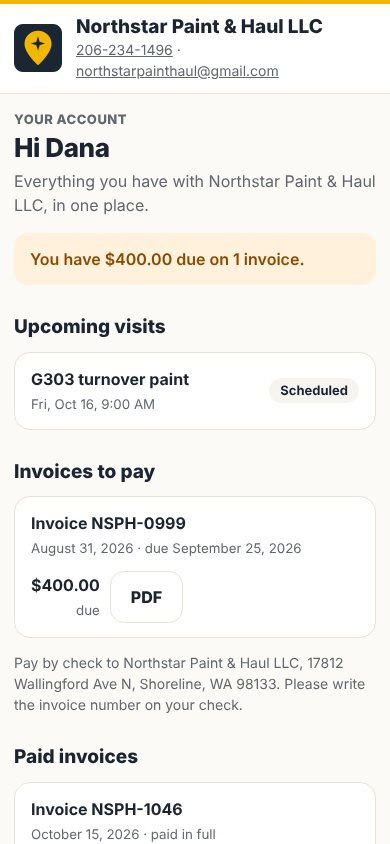
Send a quote by text or email. The customer opens it, signs with a finger, and it turns into a job on your board. They also get their own page with every quote, visit and invoice.
- Your logo, colors and terms on everything they see
- Ask for a deposit before you schedule
- A booking page they can use from your website or Google profile
Get paid in the same app you do the work in
Every invoice comes with a secure pay link. Your customer pays by card or bank transfer, and Northpin records it, marks the invoice paid and updates your books. No second app, no copying numbers.
- Card and bank (ACH) payments from your customers
- Record checks and cash with a photo of the check
- Statements and late-payment reminders for each account
- Payments flow into your reports and QuickBooks export
Know who owes you, and what you made
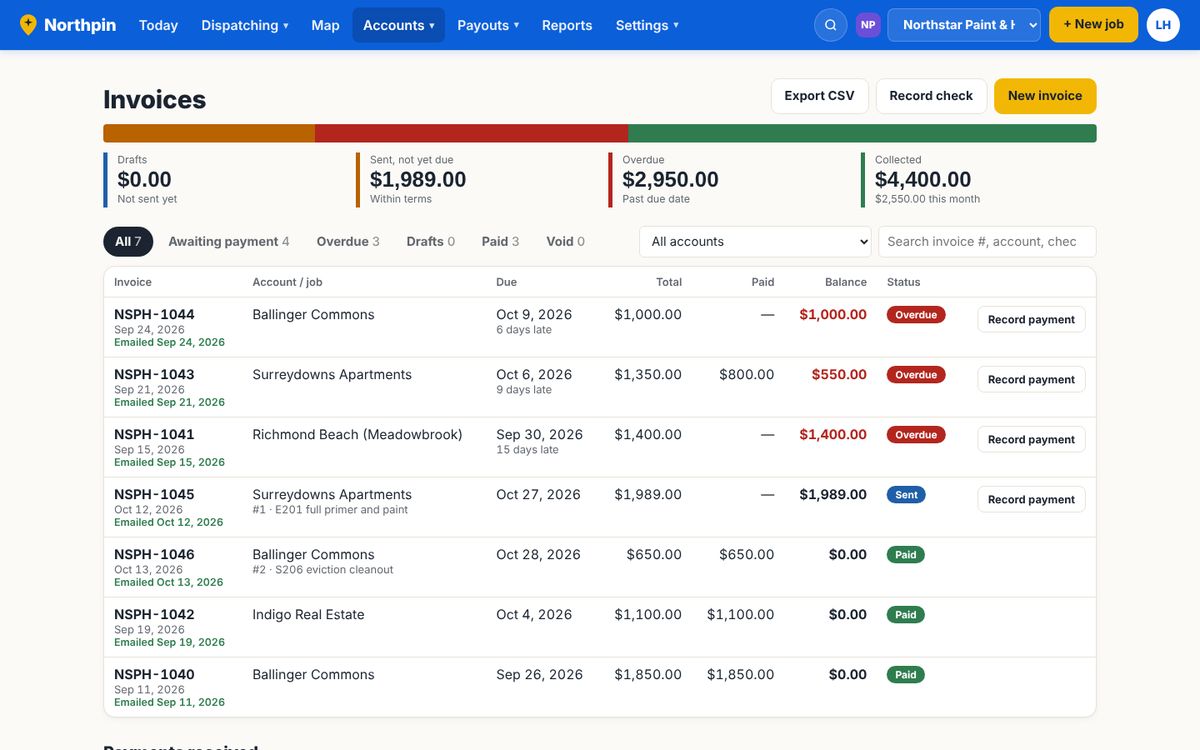
Invoices fill themselves in from the job. You see what's overdue at a glance and send a statement in one click. At tax time, your profit and loss, crew pay and 1099s are already done.
- Overdue, due soon and paid, color-coded
- Expenses with receipt photos, crew pay and subcontractors
- Exports QuickBooks Online can import
Built for the trades that run on crews and trucks
Started inside a Seattle-area contracting company that was tired of juggling five apps and a whiteboard. It's built for crews in all of these:
- HVAC
- Plumbing
- Electrical
- Roofing
- Landscaping
- Lawn Care
- Pool Service
- Pest Control
- Painting
- Tree Care
- Junk Removal
- Handyman
- Cleaning
- Commercial Cleaning
- Remodeling & Renovations
- Pressure Washing
- Window Cleaning
- Construction & Contracting
One price per company. Everything included.
Try everything free for 30 days. Pick a plan when you're ready.
Starter
- Schedule, Job board and the crew app
- Quotes customers sign online
- Invoices and built-in payments
- Booking page and customer portal
- AI that reads your rate sheet
Pro
- Everything in Starter
- Text messages and visit reminders
- Live crew map and route history
- QuickBooks exports and 1099s
Team
- Everything in Pro
- Room for a bigger crew
- Priority support
People means everyone who signs in: owner, office and crew. Customers are free and unlimited. Card and bank payments from your customers are processed by our payments partner at standard rates. Refer another company and get a free month when they sign up.
Questions owners ask
Does my crew need to download an app?
It works on any iPhone or Android phone. They open the invite link, sign in, and add Northpin to their home screen so it opens like any other app. Jobs you dispatch show up there, and it keeps working when the signal drops.
How do payments work?
Every invoice has a secure pay link. Customers pay by card or bank transfer, and the money goes to your bank account through our payments partner. Northpin marks the invoice paid and records it in your books. You can also log checks and cash.
Can I bring my customer list?
Yes. Export a spreadsheet from QuickBooks, Jobber, Housecall Pro, Excel or Google Sheets, and import it in a minute. Anyone already in Northpin is skipped.
I run more than one company. Do I need two accounts?
No. One sign-in, and you switch between companies from the top bar. Each company keeps its own customers, prices, trucks, team and books.
Does it work with QuickBooks?
Northpin exports invoices, payments, customers and expenses in files QuickBooks Online can import, with your own account names.
Is my data safe?
Every company's records are walled off from every other company's at the database level. You can turn on two-step sign-in, and crew members only ever see their own jobs.
What happens after the free trial?
Pick Starter, Pro or Team and pay monthly. If you don't, your account pauses; nothing is deleted.